
Coaching Support (Information and Advice)

Seasonal communications to FLL Explore Coaches.  The national FIRST program and the Washington state FIRST partner organizations post messages to the official team coaches throughout the season.  Use these links to the blogs to catch up on past messages:

Per-student Team Startup Contributions.  The per-student contributions to team startup costs that ARBC collects to get a team registered are due as soon as a team containing their student forms.  Parents make the contribution by buying a Team Membership Token (TMT) through the ARBC website.  The only way a coach knows the student fees have been paid is through the receipt of a TMT for that student.

Quickstart

Ten Steps for Getting Started

These ten steps may sometimes overlap or need to completed out of order – adapt and overcome.

1. Form a team

Teams can be formed from any group of like-minded individuals of the appropriate age/grade for the program.  ARBC assists with team formation by collecting the names of interested students which we share with the people who have volunteered to coach teams.  An FLL Explore team must have two adult coaches for up to six students.  ARBC doesn’t provide coaches for teams, so you are a vital enabling factor in bringing this program to life if you have volunteered to coach.


2. Select a meeting location

Teams can meet anywhere that is acceptable to all parents and students involved with the team.  Ideal meeting locations have enough room for the team to meet and carry out their work, and to store their materials between team meetings.  Many teams meet in the students’ school as a convenience, but as community teams cannot use an Anacortes School District facility until an hour after the end of the school day.


3. Select meeting days/times

FLL Explore teams usually meet once per week for three to four months (this can be tailored depending on time availability).  Meetings can be 60 to 90 minutes in length; shorter meetings may need multiple meetings to cover some of the recommended “Session” material in the Team Meeting Guide.  Younger students may find longer meetings difficult.  Making the most of the available meeting time works best with engaged students.  All students/parents must be committed to the selected days/times – team members that arrive late/leave early will disrupt the team’s work.


4. Complete the on-line FIRST coach signup

Two team coaches (and any mentors working at least 30% with a team) must register with FIRST and complete a background check process.  The ARBC FLL Explore administrator sets up the official team entry with FIRST, then “invites” the coaches to complete their registration and background check.  Coaches – please complete your registration as soon as you receive the invitation.

FIRST account login page (Your invitation contains the correct URL; you’ll only need this direct link if you lose it and don’t have a bookmark.)


5. Collect Team Management Tokens from parents

ARBC collects team startup contributions by selling Team Membership Tokens (TMTs) through the website.  The funds help cover the cost of getting the team officially registered with FIRST and other startup expenses.  Electronic payments through the website are the currently preferred collection method.  Coaches should collect TMTs from students as soon as the team starts meeting; if a student/parent doesn’t provide a TMT for a given student, then they probably haven’t contributed to the team startup expenses (yet).  ARBC offers a 100% scholarship for students with financial need identified as eligibility for free/reduced lunch through the Anacortes School District.


6. Acquire/review season materials and team equipment 

Most of the FIRST seasonal challenge materials are available on-line and can be downloaded; some are also provided in hardcopy form once your team is registered.  ARBC loans LEGO SPIKE Essentials sets to teams that ARBC supports; ARBC also orders/pays for those team’s official FIRST season materials using a combination of the team startup contributions and ARBC resources as needed.

ARBC does not provide an electronic device to run the SPIKE Essentials programming app.  The software is freely available from LEGO Education through the Internet, but a team coach or other parent must supply a compatible device.

If you have questions about any of the resources such as how or whether you are expected to use them, please contact the ARBC FLL Explore administrator for help.  (Send e-mail to Info@AnacortesRobotics.org if you don’t know who to ask.)


7. Start holding meetings

Use the FIRST-provided  materials to organize and conduct the team meetings.  FIRST includes planning for ten to twelve sessions; a session may be one meeting or extend over two meetings.  Coaches can tailor the material up or down to meet team needs, but try to stay true to the program and avoid cutting out too much material.  (“Tailor” means add or remove material to fit time/interest or other constraints.)


8. Formally register the team members with FIRST

Once a team has started meeting, coaches must “Invite” parents to register their students on the FIRST website to complete the team registration with FIRST.   The ARBC team formation process collects the parent’s e-mail addresses and phone numbers; the ARBC FLL Explore team administrator will share them with the team coaches so that coaches can contact parents if necessary.


9. Ask for help/guidance as needed

Part of ARBC’s support for teams is help and guidance for solving problems that may arise.  If a team’s coaches and parents have issues with understanding how to guide the team, contact the ARBC FLL Explore administrator (use Info@AnacortesRobotics.org if you don’t know the person’s direct e-mail).


10. Have fun, stay sane.

An FLL Core Value is having fun (usually while working hard).  Coaches work hard, but should have fun, too.  Ask for help/guidance as needed by contacting the ARBC FLL Explore administrator or sending e-mail to Info@AnacortesRobotics.org.

Planning Team Meetings

The Team Meeting Guide that comes with the seasonal materials provided by FIRST describes each meeting (session).  FIRST has also created a set of slides (PowerPoint format) to help plan your team’s sessions.  These are found in FIRST’s resource library (see #6 above).

Going to an FLL Explore Festival

FLL Explore isn’t a competition, so you won’t be leading the team to a tournament.   FLL Explore teams celebrate at a Festival instead.  The program materials you receive after your team is registered explain what the team needs to do to get ready for the Festival.  As a coach, you should keep the parents and student team members informed about their end of season Festival.  If you don’t see communications from ARBC regarding a Festival during your team’s season, contact ARBC to see why.

Although FIRST Washington holds FLL Explore Festivals, they are typically co-events with other FIRST tournaments, and often located an hour or more away from Anacortes.  ARBC holds our own local Festivals, so check with the ARBC FLL Explore administrator for the date/time of the Festival at the end of your FLL Explore season.

Your team can attend as many Festivals as the team coaches and parents would like, but you’ll have to sign up for most of them individually.  All ARBC-sponsored teams are automatically welcome at our local Festival.

Detailed Framework for Coach Training

Program Overview


Concept

FIRST LEGO League (FLL) Explore teams focus on the fundamentals of engineering as they explore real-world problems, learn to design and code, and create unique solutions made with LEGO® building elements and powered by LEGO® Education robotic components.

Teams discover and explore a new problem domain each year.  Using seasonal materials supplied by FIRST along with additional equipment, the adult coaches guide the team through their seasonal journey, and (when possible) bring in community resources such as local experts and institutions, as well as books, movies, Internet websites, etc. to help the team with their journey.  The team creates artifacts using an Engineering Design Process and shares them with their community.  The season ends with a Festival where multiple teams come together and share what they have learned with each other and adult reviewers.  The adult reviewers provide the team with positive feedback, and celebrate the team strength’s that they observed during the review process.


Team

A FIRST LEGO League (FLL) Explore team consists of 2 adult coaches and up to 6 students in grades 2 through 4 (ages 6-10).  The FIRST Youth Protection Program (YPP) requires the presence of 2 adult coaches with student team members at all times in order to reduce risk to students and adults.  Teams may have additional adult mentors if available and desired.  The team format is an important part of the program: Learning to work closely with others, taking turns leading and listening, and using everyone’s abilities to enhance the team’s  performance is a desirable outcome.  The Core Values emphasize teamwork.  When possible, and in accordance with their own abilities, team coaches and mentors may use team building exercises and other techniques to foster team identity.


Meetings

FLL Explore meetings are typically held once per week, on a fixed schedule, at a fixed location, so that they can fit into parent/children schedules predictably.  The timing and duration of meetings affects the students’ abilities and attitudes.  A 90 minute team meeting that feels just like school, taking place right after school, can cause wiggles and loss of attention.  Incorporating some kind of snacks, informal break time(s), and/or having meetings start only after a longer break from the school day can enhance student attention.  Fun is a Core Value and an essential part of keeping student interest high.

ARBC helps ARBC-supported teams arrange meeting space within the Anacortes School District (ASD) facilities and provides the insurance rider required for teams to use the ASD space, if so desired.  Teams can meet wherever the coaches and other team parents can arrange space; teams can meet at churches, community centers, or even a parent’s house, as long as all team parents are in agreement.

ASD facilities have a restriction; community groups cannot use the schools until a time beginning one hour after the end of the contracted work day.  Some teams from Island View have found it beneficial to use the Anacortes Middle School.  Since the middle school releases an hour before the elementary schools, students that can walk over to AMS can meet there without waiting the hour they would have to wait to use their own elementary school.

The structure/activities of team meetings is up to the coaches, but the FIRST Team Meeting Guide provides recommendations for the structure and the activities for each team meeting that serve as a good starting point.  Depending on their own knowledge, skills, and experience, coaches can stick close to the recommendations or add variety to enhance the student’s experience.


Season

The basic foundation of a team’s season is a series of ten or so sessions laid out in the FIRST Team Meeting Guide (the number can vary from year to year).  An individual session may fit into one team meeting, or it may need to be spread across multiple team meetings in order to avoid rushing through the experience and limiting the potentials for learning and fun in each session.  A suggestion for the time spent on each activity/session is provided in the Team Meeting Guide.  In some cases, students may benefit from repeating all or part of a particular session.

Coaches may also have the opportunity (depending on available resources, schedules, and ability) to incorporate field trips into a team’s season.  These have the potential to add a lot of fun and excitement for the students, but require additional support from other parents to make them happen.


Festivals

FLL Explore is not a competition-based program, unlike FLL Challenge and the other senior FIRST robotics programs.  However, teams are expected to attend an event around the end of their season called a Festival.  The Festival is an opportunity for teams to share their work with each other, their parents, and adult reviewers.  They will receive an award based on their interactions with the reviewers and the reviewers assessment of their work.  For many students, this can be a first experience in public speaking, presenting work, and being interviewed.  ARBC provides a Fall/Winter and a Spring Festival to which all ARBC-supported teams are invited.  The FIRST Team Meeting Guide includes at least one session that helps a team prepare for the Festival.

Primary Support Tools

The primary support tools that FIRST provides for FLL Explore are accessed through the FIRSTInspires website.  These tools are:

  • Dashboard
  • Resource Library
  • Youth Protection Program
  • On-line Training


FIRST Inspires website

The website https://firstinspires.org/ is the primary interface between the national/global FIRST organization and all teams, team contacts (coaches, mentors, students), and parents.  There are many different kinds of information to be found on the website, but for active teams/coaches, there are four that are most important.
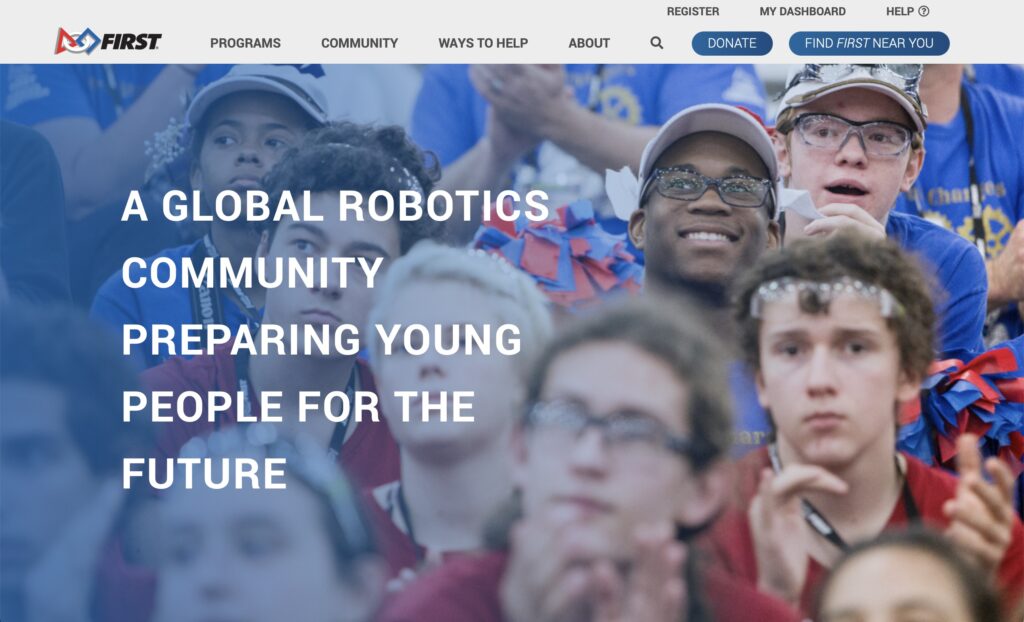
FIRST Inspires Home Page


Dashboard

The Dashboard is where you will find useful tabs labeled “My Teams”, “Parent/Guardian – Youth”, and “Volunteer Registration”
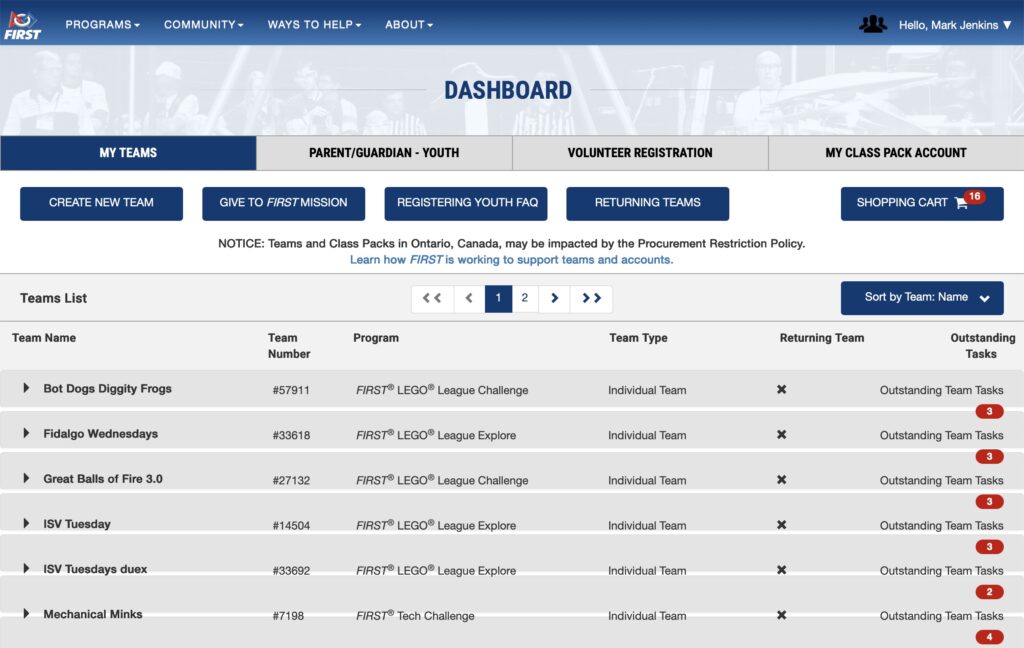
FIRST Inspires Dashboard
  •  My Teams – if you are a team coach, your team(s) will be listed here.  You use this to update your team’s name under Team Options -> Team Information -> Team Profile, and manage your team contacts under Team Contacts/Roster -> Contact Options -> Manage Contacts 
  • Parent/Guardian – Youth – This is where parents (including coaches, if they are a parent as well) have their registered dependents who are on/were on FIRST teams; this is where parents accept the waiver for students so that they can attend events
  • Volunteer Registration – This is where you can either volunteer to support a FIRST event (such as a tournament) or use FIRST to find a team to support in your area; if you are already supporting a team through ARBC you do not need to use this option to find a team to support.


Resource Library

A plethora of materials.
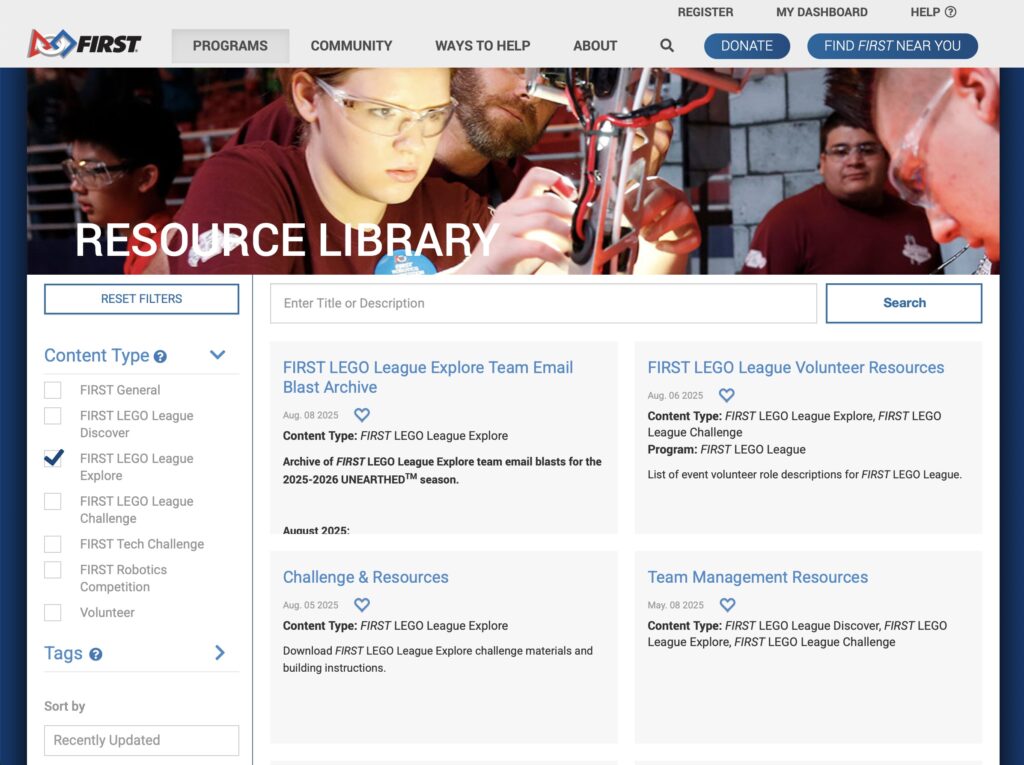
FIRSTINspires FLLE Resource Library

Most important:


Youth Protection Program

As described by FIRST, “The purpose of the FIRST® Youth Protection Program is to provide coaches, mentors, event volunteers, employees, Program Delivery Partners, team members, parents, guardians of team members, and others working with FIRST programs with information, guidelines, and procedures to create safe environments for FIRST participants.
 
When you become an official FLL Coach, you create a FIRST account and provide information to FIRST for background screening.  This is the base level of interaction that you can have with the FIRST Youth Protection Program.  For a broader introduction to the program and its policies and procedures, use this link: FIRST Youth Protection Program.  All coaches should at least follow the link and access the content under “Youth Protection Policies & Training”.  The rest of the content found at the link above provides more information about the program.


On-line Training

FIRST is in the process of bringing training into the Dashboard. Launching soon, the new FIRST Training platform will be accessible from your FIRST Dashboard by clicking on the ‘My Training’ button on the top right of the dashboard. In the meantime, the most relevant training for new coaches and mentors is here: Coaching and Mentoring SCORM


Accessing FIRST Inspires resources

Some of the resources are available without an account or login.  For example, you do not need a FIRST account in order to access the Resource Library.  This means that you have on-line access to the seasonal material documents before registering an account or becoming a team coach.  You can use the link (above) to see those materials whenever you like.

Other resources may require an account/login.  For example, in order to access the Dashboard, you must have a registered account with FIRST.  The process of becoming a coach includes creating such an account, or you can do it yourself before you become a coach if you like.  Use the “Register” link at the top of the FIRST Inspires website.  Be sure to use the same e-mail address as you provide to ARBC when you create the account so that when the ARBC administrator sends you a coaching “invite” it works with your established FIRST account.

Fundamental Team Tools

These are the bare minimum of required materials and equipment to run an FLL Explore team.


FIRST Seasonal Materials

FIRST releases new seasonal materials for FLL Explore in early August, putting them up on the FIRST Inspires website.  Once your team is officially registered with FIRST, a package with hardcopy documents and the Explore Set is sent out from FIRST and delivered to your team (possibly through a team administrator).  If you don’t have your document package yet, you can find on-line copies of these documents in the FLL Explore Resource Library under “Challenge & Resources”:

  • Season Overview – a one-page description of the program and this season’s theme
  • Team Meeting Guide – a multipage document that coaches to use to prepare to lead their team.  You will refer to this frequently as you plan, prepare, and guide your team’s journey.  It is a critical part of a coach’s toolset.
  • Engineering Notebook – a student workbook (one for each student) that both provides information to students and lets them record their thoughts and ideas.  Engineers frequently use notebooks to record their thoughts as they work.  To prevent loss, team coaches may want to hand Engineering Notebooks out at the start of each meeting, and collect and store them at the end.
  • Explore Set – includes the Explore model, mat, building instructions, and prototyping pieces.  Leave the LEGO pieces in their numbered bags until the team reaches the sessions that need them.  A team coach will need to store the Explore Set and any team-constructed artifacts between team meetings.

Equipment

  • LEGO Education SPIKE Essentials kit (older: WeDo) – FLL Explore teams use LEGO Education robotics elements to add a sensor and motor to their LEGO creations (https://education.lego.com/en-us/products/lego-education-spike-essential-set/45345/)
  • Desktop, laptop, or tablet – A compatible Bluetooth-enabled electronic device runs the LEGO programming software that teams use to control the sensor/motor built into their LEGO creation(s).  Team coaches must supply these devices for their teams – they are not part of the seasonal materials or the equipment provided by ARBC for ARBC-supported teams.
  • LEGO Education SPIKE app – LEGO programming software; runs on an electronic device, interacts with sensor and motor via Bluetooth wireless communications.  This app is freely available, but may not run on all devices.  Coaches must determine that their available device(s) can run the app.  Coaches must also determine how they will store any student-developed code between team meetings.

Core Values

The FIRST® Core Values are fundamental to FIRST and unique to its programs. They emphasize friendly collaboration, respect for the contributions of others, teamwork, learning, and community involvement and are part of our commitment to fostering, cultivating, and preserving a culture of equity, diversity, and inclusion.  We express the FIRST philosophies of Gracious Professionalism and Coopertition through our Core Values:

  • Discovery: We explore new skills and ideas.
  • Innovation: We use creativity and persistence to solve problems.
  • Impact:  We apply what we learn to improve our world.
  • Inclusion: We respect each other and embrace our differences.
  • Teamwork: We are stronger when we work together.
  • Fun: We enjoy and celebrate what we do!

It may seem strange for these to be identified as Fundamental Team Tools, but they can/do function in that manner.  It is up to the coaches to make sure that they are a part of the team’s ethos, however.


Engineering Design Process

Although the exact processes by which any given engineer identifies problems and finds solutions may use different labels and have differing numbers of steps, they can all be related to one another.  Virtually all of them are iterative (applied over and over) and recursive (applied at varying levels of detail).  For the purposes of FLL Explore, FIRST provides these labels for you to use as the iterative FLL Explore Engineering Design Process.
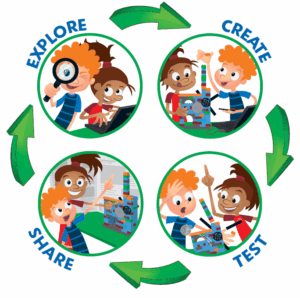
  • Explore – find out about a problem domain and develop ways to solve a problem (or improve an existing solution) related to it
  • Create – make your solution (a physical artifact, a computer program, a process description, etc.)
  • Test – try out your solution to see if it works as intended and as well as you hoped
  • Share – communicate your solution with others

(repeat as needed, usually often, and at multiple levels)

Try to think through examples from your own life regarding the use of an iterative process to refine a process or artifact that you can use to explain this concept to student team members.

Secondary Support Tools

FIRST and FIRST Washington each provide additional support tools that team coaches can use to help understand how to run a team, aspects of the seasonal challenge, and other topics of interest.

  • E-mail communications 
  • Social Forums