

Coaching Support (Information and Advice)

National and State-level E-mail messages to FLL Challenge Coaches.  The national FIRST program and the Washington state FIRST partner organizations post messages to the official team coaches throughout the season.  Use these links to the blogs to catch up on past messages:

ARBC’s Per-student Team Startup Contributions.  The per-student contributions to team startup costs that ARBC collects to get a team registered are due as soon as a team containing the student forms.  Parents make the contribution by buying a Team Membership Token (TMT) through the ARBC website.  The only way a coach knows the student fees have been paid is through the receipt of a TMT for that student.

Quickstart

Ten Steps for Getting Started

These ten steps may sometimes overlap or need to completed out of order – adapt and overcome.

1. Form a team

Teams can be formed from any group of like-minded individuals of the appropriate age/grade for the program.  ARBC assists with team formation by collecting the names of interested parents and students, which we share with the people who have volunteered to coach teams.  An FLL Challenge team must have two adult coaches for up to ten student team members.  ARBC doesn’t provide coaches for teams, so thank-you if you have volunteered to coach.

2. Select a meeting location

Teams can meet anywhere that is acceptable to all parents and students involved with the team.  Ideal meeting locations have enough room for the team to meet and carry out their work, and to store their materials between team meetings.  If possible, avoid having to setup and take down the robot game table for each meeting (the robot game table is 4’ x 8’, so this is not always possible).  Many teams meet in the student’s school as a convenience.  The AMS Robotics Club students meet after school, but elementary school student teams are considered community teams that cannot use an Anacortes School District facility until an hour after the end of the school day.

3. Select meeting days/times

FLL Challenge teams must accomplish a lot!  Most teams need to meet at least twice per week.  Each meeting must be long enough to accomplish a good chunk of work (2 hours or so).  Students may find longer meetings difficult unless they are truly motivated.  Afternoons after school are a popular time choice, especially for teams that meet in school facilities.  Make sure that all students/parents are committed to the selected days/times – team members that arrive late/leave early will disrupt the team’s work.

4. Complete the on-line FIRST coach signup

Two team coaches (and any mentors working at least 30% with a team) must register with FIRST and complete a background check process.  The ARBC FLL team administrator sets up the official team entry with FIRST, then “invites” the coaches to complete their registration and background check.  Coaches – please complete your registration as soon as you receive the invitation.

FIRST account login page (Your invitation contains the correct URL, you’ll only need this direct link if you lose it and don’t have a bookmark.)

5. Collect Team Membership Tokens from students

ARBC collects team startup contributions by selling Team Membership Tokens through the ARBC website.  The funds help cover the cost of getting the team officially registered with FIRST and other startup expenses.  Electronic payments through the website are the currently preferred collection method.  Coaches should collect TMTs from students as soon as the team starts meeting.

6. Acquire/study team equipment and season materials

All of the FIRST seasonal challenge materials are available on-line and can be downloaded (Challenge, Updates, & Resources); some are also provided in hardcopy form once your team is registered.  ARBC receives and distributes the FIRST seasonal challenge materials for the teams that ARBC sponsors, and loans LEGO robot sets to those same teams.  If you are the coach of an ARBC-sponsored team and you have not yet received your seasonal materials, check with the ARBC FLL Challenge administrator.  (Send e-mail to Info@AnacortesRobotics.org if you don’t know who to ask.)

7. Start holding meetings

Use the FIRST-provided on-line materials to get your team started with the seasonal challenge subject and details.  Team members and coaches also need time to learn how to build/program the LEGO robot equipment.  A hardworking team can get a lot done before the official hardcopy and LEGO season materials even arrive!

8. Formally register the team members with FIRST

Once a team has started meeting, coaches must “Invite” parents to register their students on the FIRST website to complete the team registration with FIRST.  The ARBC team formation process collects the parent’s e-mail addresses; the ARBC FLL Challenge administrator will share them with the coaches.  All students must be officially registered in order to attend Tournaments.

9. Ask for help/guidance as needed

Part of ARBC’s support for teams is help and guidance for solving problems that may arise.  If a team’s coaches and parents have issues with understanding how to guide the team, contact the ARBC program support person (use Info@AnacortesRobotics.org if you don’t know the person’s direct e-mail).

10. Have fun, stay sane.

An FLL Core Value is having fun (usually while working hard).  FLL Challenge teams work hard; coaches work hard to.  Remember that it is all supposed to be fun for everyone as well as hard work.  Ask for help/guidance as needed.

Planning Team Meetings

The Team Meeting Guide that comes with the seasonal materials provided by FIRST describes each meeting (session).  FIRST has also created a set of slides (PowerPoint format) to help plan your team’s sessions.  These are found in FIRST’s resource library (see #6 above).

Going to a Tournament

FLL Challenge is a competition program, so you will be leading your team to at least one tournament.  The program materials you receive after your team is registered explain what the team needs to do to get ready for the Tournament.  As a coach, you should keep the parents and student team members informed about their Tournament date, once assigned.  If you don’t see communications from FIRST Washington regarding Tournaments by the end of October, contact ARBC or FIRST Washington to find out why.

Tournaments are a day-long activity that start around 8 am and run until 5 pm.  Judging takes place in the morning, Robot Game matches in the afternoon.  Parents cannot view judging, just the Robot Game matches.  Teams need snacks, beverages, and lunch – have parents plan/supply these items for the team.

Tournaments are scheduled by FIRST Washington only after teams register with FIRST Washington (separate from the official FIRST team registration).  ARBC-supported teams are usually registered with FIRST Washington by ARBC, because registration requires payment of a tournament registration fee by ARBC.

The first FLL Challenge tournament is called a Qualifier or Qualifying Tournament, and takes place one of the first two weekends in December.  Your team’s work must target this milestone at the very latest.  ARBC provides a practice tournament called a scrimmage on Thanksgiving weekend.  Ideally your team’s work should be ready by then.

If your team does well in their Qualifier, they can advance to the Semi-finals (held in January/February), and possibly on to the State Championship (February/March).  A comparatively small number of teams advance each year to the World Championships held in April.

Advice to Future Coaches (from a three-time coach)

Ensure the students do the work!  It’s tempting to step in and just show them how to do things, but don’t – guide their thought process if needed, or direct them to the resources they need, but always make them do the work.  They’ll become amazingly empowered, independent, and motivated!
 
Know the rules – Each student should read the whole rulebook.  Most won’t.  It’s helpful to review one rule at the start of each meeting.  That keeps it short and gives them a chance at remembering something.  Over the course of the season all the rules should get covered!
 
Same for “coding tidbit” — it’s also helpful to cover one coding tip, or a short coding lesson/review at the start of each meeting.  For example, how to define the wheel size. Again, keeping it short is good.
 
Use PrimeLessons – it’s a GREAT way to learn to code the robot  (https://primelessons.org/en/Lessons.html?tab=beyond)
 
Find a way to get the students to do a strategy for which missions they’ll try to do.  We rated each mission for how difficult it looked, then made a graph of:  how many points it’s worth on one axis, and how difficult it is on the other axis.  Then tackle the easiest ones worth the most points.
 
The innovation project is how teams advance, and it’s crucially important to do well.  Don’t overlook that fact!  Devote a lot of time to having a good project, and practice the presentation over and over again.  Compare it directly against the rubrick.  Write it TO the rubrick if you’d like!
 
Wheels – there are some assorted different wheels in the extra pieces box.  The students can experiment with them.  Personally, I found the blue wheels provided in the kits are really good, maybe the best.  However, it’s important to clean them periodically.  Wipe them down with a paper towel damp with isopropyl or brake cleaner.
 
Casters – the white plastic balls sometimes bind.  Use the metal lego casters instead, they’re more consistent and move smoothly
 
Attend the Coaches’ Chat online meetings!  And Kevin’s Corner (rule questions)!  Very helpful.  Dates & times available at firstwa.org.
 
Good luck to all the teams this season!!!
 
Mark M., FLL Challenge 2022-2023 SUPERPOWERED, 2023-2024 MASTERPIECE, 2024-2025 SUBMERGED

Detailed Framework for Coach Training

Program Overview

Concept

Friendly competition is at the heart of FIRST® LEGO® League Challenge, as teams of up to 10 students (supported by 2 adult coaches) engage in research, problem-solving, coding, and engineering as they build and code a LEGO® robot that navigates the missions of the robot game. Teams also participate in an innovation project to identify and propose a solution to a relevant real-world problem.

Teams are challenged by a new problem domain each year.  Using seasonal materials supplied by FIRST along with additional equipment, the adult coaches guide the team through their seasonal journey, and (when possible) bring in community resources such as local experts and institutions, as well as books, movies, Internet websites, etc. to help the team with their journey.  The team creates artifacts using an Engineering Design Process and shares them with their community.  Teams compete in one or more Tournaments to demonstrate the knowledge and skills they have developed.


Team

A FIRST LEGO League (FLL) Challenge team consists of 2 adult coaches and up to 10 students in grades 4 through 8 (ages 10-14).  The FIRST Youth Protection Program (YPP) requires the presence of 2 adult coaches with student team members at all times in order to reduce risk to students and adults.  Teams may have additional adult mentors if available and desired.  The team format is an important part of the program: Learning to work closely with others, taking turns leading and listening, and using everyone’s abilities to enhance the team’s  performance is a desirable outcome.  The Core Values emphasize teamwork.  When possible, and in accordance with their own abilities, team coaches and mentors may use team building exercises and other techniques to foster team identity.


Meetings

FLL Challenge meetings are typically held twice per week, on a fixed schedule, at a fixed location, so that they can fit into parent/children schedules predictably.  Incorporating some kind of snacks, informal break time(s), and/or having meetings start only after a longer break from the school day can enhance student attention.  Fun is a Core Value and an essential part of keeping student interest high.

ARBC helps ARBC-supported teams arrange meeting space within the Anacortes School District (ASD) facilities and provides the insurance rider required for teams to use the ASD space, if so desired.  Teams can meet wherever the coaches and other team parents can arrange space; teams can meet at churches, community centers, or even a parent’s house, as long as all team parents are in agreement.

ASD facilities have a restriction; community groups cannot use the schools until a time beginning one hour after the end of the contracted work day.  Some teams from Island View have found it beneficial to use the Anacortes Middle School.  Since the middle school releases an hour before the elementary schools, students that can walk over to AMS can meet there without waiting the hour they would have to wait to use their own elementary school.

The Anacortes Middle School Robotics Club team(s) do not have the restriction on team meeting times that other teams do.  Since they are recognized ASB Club, they can meet directly after school.  The AMS team meetings have started as early as 3 pm following a 2:40 pm dismissal, and as late as 5:30 pm to accommodate coach/mentor availability.

The structure/activities of team meetings is up to the coaches, but the FIRST Team Meeting Guide provides recommendations for the structure and the activities for each team meeting that serve as a good starting point.  Depending on their own knowledge, skills, and experience, coaches can stick close to the recommendations or add variety to enhance the student’s experience.


Season

The basic foundation of a team’s season is a series of twelve or so sessions laid out in the FIRST Team Meeting Guide (the number can vary from year to year).  An individual session may fit into one team meeting, or it may need to be spread across multiple team meetings in order to avoid rushing through the experience and limiting the potentials for learning and fun in each session.  A suggestion for the time spent on each activity/session is provided in the Team Meeting Guide.  In some cases, students may benefit from repeating all or part of a particular session.

Coaches may also have the opportunity (depending on available resources, schedules, and ability) to incorporate field trips into a team’s season.  These have the potential to add a lot of fun and excitement for the students, but require additional support from other parents to make them happen.


Community Interaction

The Innovation Project is greatly enhanced when local experts associated with the problem domain are included in helping the team understand the problem domain, potential problems for the team to solve, and providing feedback that helps the team improve their solution.  Team coaches play a big role in helping the team find these local experts and facilitating their interactions with the team.  The competition judging rubrics include assessing the team’s solution sharing/feedback/iteration process.


Tournaments

At a Tournament, each team is judged according to published rubrics in three areas: Innovation Project, Core Values, and Robot Design.  Each team also participates in a “best of three” series of robot game matches to determine their Robot Performance Score.  The results of all four are combined to determine awards and advancement to the next level of competition.


Primary Support Tools

The primary support tools that FIRST provides for FLL Challenge are accessed through the FIRSTInspires website.  These tools are:

  • Dashboard
  • Resource Library
  • Youth Protection Program
  • On-line Training


FIRST Inspires website

The website https://firstinspires.org/ is the primary interface between the national/global FIRST organization and all teams, team contacts (coaches, mentors, students), and parents.  There are many different kinds of information to be found on the website, but for active teams/coaches, there are four that are most important.
FIRST Inspires Home Page


Dashboard

The Dashboard is where you will find important tabs labeled “My Teams”, “Parent/Guardian – Youth”, and “Volunteer Registration”.
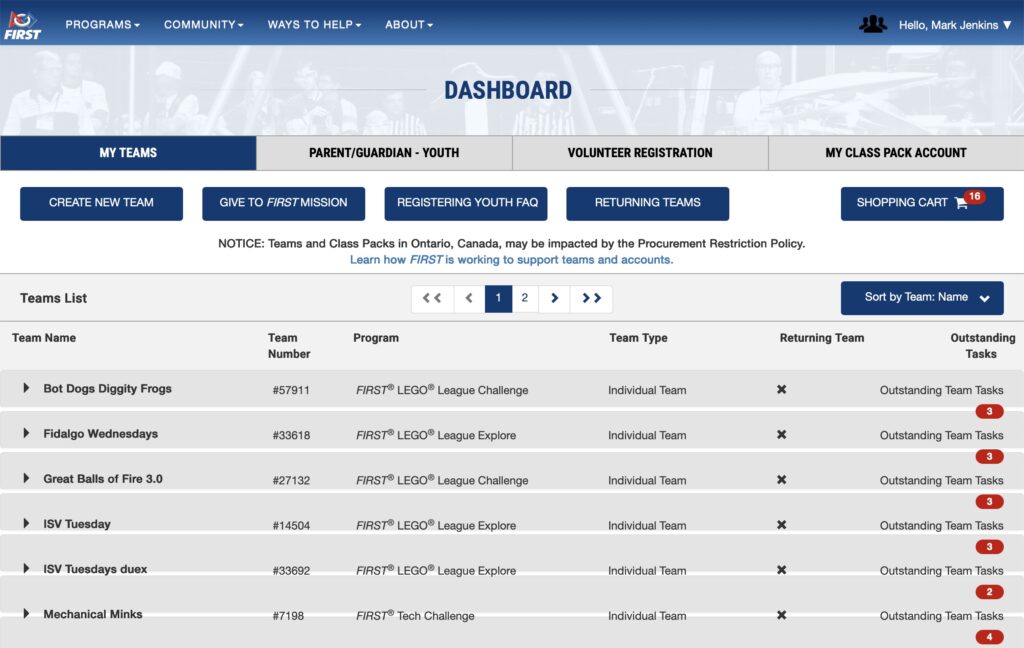
FIRST Inspires Dashboard
  • My Teams – if you are a team coach, your team(s) will be listed here.  You use this to update your team’s name under Team Options -> Team Information -> Team Profile, and manage your team contacts under Team Contacts/Roster -> Contact Options -> Manage Contacts 
  • Parent/Guardian – Youth – This is where parents (including coaches, if they are a parent as well) have their registered dependents who are on/were on FIRST teams; this is where parents accept the waiver for students so that they can attend events
  • Volunteer Registration – This is where you can either volunteer to support a FIRST event (such as a tournament) or use FIRST to find a team to support in your area; if you are already supporting a team through ARBC you do not need to use this option to find a team to support.


Resource Library

A plethora of collections of materials.
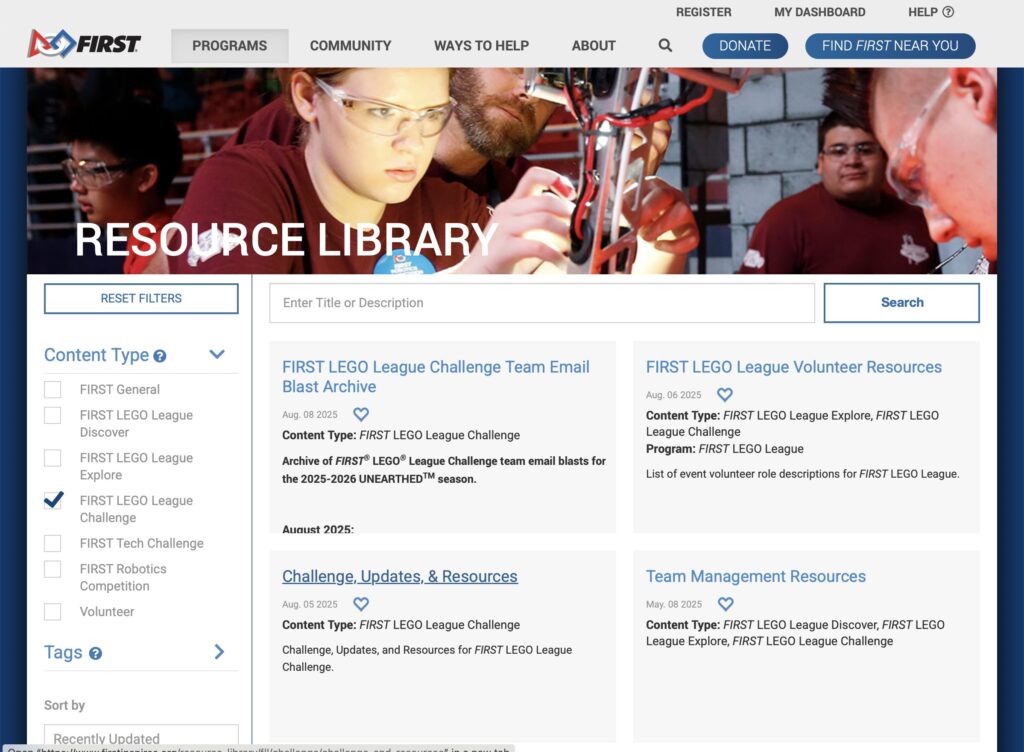
FIRSTINspires FLLC Resource Library

Most important:


Youth Protection Program portal

As described by FIRST, “The purpose of the FIRST® Youth Protection Program is to provide coaches, mentors, event volunteers, employees, Program Delivery Partners, team members, parents, guardians of team members, and others working with FIRST programs with information, guidelines, and procedures to create safe environments for FIRST participants.
 
When you become an official FLL Coach, you create a FIRST account and provide information to FIRST for background screening.  This is the base level of interaction that you can have with the FIRST Youth Protection Program.  For a broader introduction to the program and its policies and procedures, use this link: FIRST Youth Protection Program.  All coaches should at least follow the link and access the content under “Youth Protection Policies & Training”.  The rest of the content found at the link above provides more information about the program.


On-line Training for FIRST Volunteers

FIRST is in the process of bringing training into the Dashboard. Launching soon, the new FIRST Training platform will be accessible from your FIRST Dashboard by clicking on the ‘My Training’ button on the top right of the dashboard. In the meantime, the most relevant training for new coaches and mentors is here: Coaching and Mentoring SCORM


Accessing FIRST Inspires resources

Some of the resources are available without an account or login.  For example, you do not need a FIRST account in order to access the Resource Library.  This means that you have on-line access to the seasonal material documents before registering an account or becoming a team coach.  You can use the link (above) to see those materials whenever you like.

Other resources may require an account/login.  For example, in order to access the Dashboard, you must have a registered account with FIRST.  The process of becoming a coach includes creating such an account, or you can do it yourself before you become a coach if you like.  Use the “Register” link at the top of the FIRST Inspires website.  Be sure to use the same e-mail address as you provide to ARBC when you create the account so that when the ARBC administrator sends you a coaching “invite” it works with your established FIRST account.

Fundamental Team Tools

These are the bare minimum of required materials and equipment to run an FLL Challenge team.


FIRST Seasonal Materials

FIRST releases new seasonal materials for FLL Challenge in early August, putting them up on the FIRST Inspires website.  Once your team is officially registered with FIRST, a package with hardcopy documents and the Challenge Set is sent out from FIRST and delivered to your team (possibly through a team administrator).  If you don’t have your document package yet, you can find on-line copies of these documents in the FLL Challenge Resource Library under “Challenge, Updates, & Resources”:

  • Season Overview – a one-page description of the program and this season’s theme
  • Team Meeting Guide – a multipage document that coaches to use to prepare to lead their team.  You will refer to this frequently as you plan, prepare, and guide your team’s journey.  It is a critical part of a coach’s toolset.  FIRST provides one (1) hardcopy document with team team registration.
  • Engineering Notebook – a student workbook that both provides information to students and lets them record their thoughts and ideas.  Technically optional, but useful, especially for younger teams.  Engineers frequently use notebooks to record their thoughts as they work.  To prevent loss, team coaches may want to hand Engineering Notebooks out at the start of each meeting, and collect and store them at the end.  Note that FIRST only supplies two (2) Engineering Notebooks with a team registration; extra Engineering Notebooks must be purchased separately in packs of ten (10).
  • Mission Model Building Instructions – the definitive assembly instructions for the Robot Game mission models.  The team’s models must be built exactly as described so that the team’s robot can reliably score points on mission models built by others.
  • Robot Game Rulebook – the definitive/authoritative source of rules for playing and scoring the Robot Game.  Students must study, learn, and develop their Robot Game strategy and missions using the information in this book.  FIRST provides two (2) copies with team registration.
  • Challenge Updates and Clarifications – updated as needed, this on-line only document is the definitive/authoritative source of updates to the Challenge, especially the Robot Game mission rules described in the Robot Game Rulebook.  Students and coaches should regularly check for updates, then see whether the updates affect their work on the Innovation Project or Robot Game.
  • Challenge Set – includes the Robot Game mat and LEGO mission model parts.  The mission model parts are stored in numbered bags that should not be opened until each model using a given numbered bag is to be built.  Student team members assemble the mission models using on-line assembly instructions.  A team coach will need to store the mat and mission models between team meetings.

Equipment

  • LEGO Education SPIKE Prime robot kit (older: EV3 robotics kit) – FLL Challenge teams use LEGO Education robotics elements to build a team robot using sensors and motors to play the Robot Game (https://www.lego.com/en-us/product/lego-education-spike-prime-set-45678).  [Note: this link shows the standard SPIKE Prime set; FLL Challenge teams buy an enhanced set through the FIRST website; it includes extra components].  ARBC provides one or more  of the enhanced SPIKE Prime robot kits to ARBC-supported teams.
  • Desktop, laptop, or tablet – A compatible Bluetooth-enabled electronic device runs the LEGO programming software that teams use to program their team robot.  The robot can run stored programs without the programming device, but making any code changes requires the device.  Team coaches must supply these devices for their teams – they are not part of the seasonal materials or the equipment provided by ARBC for ARBC-supported teams.
  • LEGO Education SPIKE app – LEGO programming software; runs on an electronic device, interacts with the team’s LEGO robot using USB wired communications.  This app is freely available, but may not run on all devices.  Coaches must determine that their available device(s) can run the app.  Coaches must also determine how students will store/manage all student-developed code.
  • Robot Game Table – a 4 foot by 8 foot table with 2×3 or 2×4 side walls constructed according to FIRST guidelines published in the FIRST Resource Library at the seasonal Challenge materials and supplements link shown in the Primary Support Tools section of this training material.  Coaches either have to borrow or build a suitable table; ARBC does not have them on-hand (but may known where one can be borrowed).

Core Values

The FIRST® Core Values are fundamental to FIRST and unique to its programs. They emphasize friendly collaboration, respect for the contributions of others, teamwork, learning, and community involvement and are part of our commitment to fostering, cultivating, and preserving a culture of equity, diversity, and inclusion.  We express the FIRST philosophies of Gracious Professionalism and Coopertition through our Core Values:

  • Discovery: We explore new skills and ideas.
  • Innovation: We use creativity and persistence to solve problems.
  • Impact:  We apply what we learn to improve our world.
  • Inclusion: We respect each other and embrace our differences.
  • Teamwork: We are stronger when we work together.
  • Fun: We enjoy and celebrate what we do!

It may seem strange for these to be identified as Fundamental Team Tools, but they can/do function in that manner.  It will be up to the coaches to make sure that they are a part of the team’s ethos, however.


Engineering Design Process

Although the exact processes by which any given engineer identifies problems and finds solutions may use different labels and have differing numbers of steps, they can all be related to one another.  Virtually all of them are iterative (applied over and over) and recursive (applied at varying levels of detail).  For the purposes of FLL Challenge, FIRST provides these labels to use as the iterative FLL Challenge Engineering Design Process.
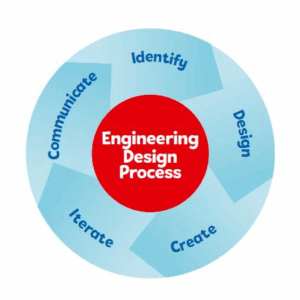
  • Identify – describe the problem to be solved or need to be met
  • Design – plan out a solution to the identified problem using drawings, calculations, and descriptions that describe how it should be built
  • Create – use your design to construct your solution (a physical artifact, a computer program, a process description, etc.).  Once your solution is ready, test it to see how well it works!
  • Iterate – based on results from testing your solution, go through the Engineering Design Process again to improve it; you may need to update your problem description, your design, or just the construction of the solution to make the solution better fit the need.
  • Communicate – share your solution with others

(repeat as needed, usually often, and at multiple levels)

Try to think through examples from your own life regarding the use of an iterative process to refine a process or artifact that you can use to explain this concept to student team members.  Guide the students through using the steps of the process to solve problems of all types and all levels of detail as they journey through their season.

Secondary Support Tools

FIRST and FIRST Washington each provide additional support tools that team coaches can use to help understand how to run a team, aspects of the seasonal challenge, and other topics of interest.

  • E-mail communications 
  • Social Forums

Additional Information and Suggestions

Notable FIRST Supplements

There are materials that FIRST provides that can enhance team performance, but were not covered under “Fundamental Team Tools”.  The are all found in the “Challenge, Updates & Resources” section of the FLL Challenge Resource Library.

  • Robot Game Missions – video that describes the Robot Game and its missions.  Helpful as an alternative format to the Robot Game Rulebook’s description of the missions.  Note that the Robot Game Rulebook’s definitions are authoritative, however.
  • Preparing for your Event video – helps teams understand what happens at a tournament
  • Rubrics – the actual score sheets used by judges during competition.  Teams can use these to evaluate/improve themselves.
  • Judging Session Flow Chart – helps team plan their behavior in their approximately 30 minute judging session.  This is the timing that judges expect teams to follow and which they will enforce.

Coaches can use these resources to help them “get smart” about how to guide the students for this season:

  • Multimedia Resources – on-line and hardcopy resources that can help your student team members understand this season’s problem domain
  • Session Powerpoint slides – detailed PowerPoint slides outlining possible meeting activities, structured to support the Team Meeting Guide.  Note that these open up an alternative website www.firstlegoleague.org, which can be confusing.
  • Code for Guided Mission – sample program code for guiding a basic robot through one of the Robot Game missions.  The code is a good start, but usually can benefit from improvements made by more experienced team members.
  • Technical Resources – a page with links to a variety of technical support information for SPIKE Prime, EV3, and Robot Inventor kits.

Unlike the Rulebooks and Rubrics, coaches should not feel bound or limited by these resources – they are supplemental, not prescription or directive.

If you have questions about any of the resources such as how or whether you are expected to use them, please contact the ARBC FLL Challenge administrator for help.  (Send e-mail to Info@AnacortesRobotics.org if you don’t know who to ask.)

Competition Scoring details

Competition scoring is based on points awarded through judging (75%) and points scored by playing the robot game (25%).

Judging points

The team will be judged for their display of Core Values (during the team’s presentations and the Robot Game), their Innovation Project, and their Robot Design.  Teams are scored as Beginning (1), Developing (2), Accomplished (3), or Exceeds (4) in a number of specific objectives in each of the judged areas.  These judging objectives are described in a set of judging rubrics.  Coaches should have the rubrics on-hand for team use and require the students to judge their own presentations as they iteratively improve them throughout the season:

Robot Game points

The team’s performance in the Robot Game is scored at the end of each match.  Only the top scoring match (out of three matches) is used for the team’s overall Robot Game score.  Coaches should have this scoresheet on-hand and require students use it to score their own robot game missions during testing and practice matches:

IMPORTANT!
All robot game wording means precisely and only what it says. If a detail is not mentioned, it does not matter.  Students and coaches must read the Robot Game Rulebook carefully!

Planning Team Meetings

Third-party Guides

Some advanced FLL teams put together guides to help coaches, coach (these may build on the official FIRST season materials but are not official products):

Session/Weekly Progress Slides and other materials

FIRST’s Team Meeting Guide provides an outline for holding team meetings that coaches can use.  Although the FIRST Resource library contains the baseline set of information a team needs to compete, the FIRSTLEGOLeague.org website has supplemental information that you may find useful.  Among them is a set of PowerPoint slides provides more directed approach to helping students, attempting to drive students towards required outcomes.  (These might be more useful as sources of ideas rather than strict guidance.)  You may have to download each set of slides to your computer if your browser doesn’t display them directly.  Each “session” covers the material for approximately one week out of a twelve week (3 month) build season, but probably cannot be followed blindly:

The existence of this additional website can be confusing because it duplicates some material on the main FIRST website, but it does have extra resources.

Completing the Innovation Project

The Innovation Project requires student team members to learn about a problem domain, find a problem in that domain, and then come up with an innovative (new) solution to the problem.  The act of performing investigative research does not always come easily to team members, many of whom are more used to being given explicit problem questions that they answer by referring back to specific instructional material.

The more engaged you can help the students become in researching/investigating the problem domain, the more likely they are to be able to start thinking about problems and solutions.  Finding members of the community who have experience in the problem domain and having them speak with the students for 30 to 60 minutes to help them see very concrete ideas and problems is very helpful.

The actual judging of the Innovation Project is based entirely on the team’s judged presentation at the competition.  Their presentation can include handouts of materials to the judges, but the judges will not keep any of the materials past the judging session.  Every student should be engaged in the presentation, and every student should be prepared to answer questions about the problem domain, their problem and their solution.  This doesn’t mean that every student should know everything, just that every student should have at least a piece of the puzzle and be prepared to talk about it.

It is also helpful if the student team members can talk about:

  • how they came up with their idea for a problem
    • Where did they go for ideas?
    • What problems did they consider and discard before settling on the one their project is based upon?
  • how they developed their solution:
    • What ideas for a solution did they consider?
    • How did they evaluate possible solutions?
    • How did the pick the one they thought was best?
  • to whom they have shown the solution:
    • Friends and classmates?
    • Parents and relatives?
    • Experts in the community who can provide feedback on the details of their problem and proposed solution?
  • feedback they received about their solution, and
  • what updates they have made to their solution based on feedback.

Teams that can talk about the process of their Innovation Project in addition to the project itself will probably do better in judging.  Even better if they show clear signs of an iterative process that incorporates feedback from others. 

Building Mission Models/Playing the Robot Game

The instructions for building the mission models are located on the FIRST LEGO League website (with a link to them on the FIRST Inspires website in the Resource library.  Have the students read the Robot Game Rulebook to learn how to “play” the missions in detail – the Rulebook is the authoritative specification for scoring points in the robot game.  (Note that the periodic Challenge Updates that are published in the Resource Library MAY change some of the scoring criteria if a rule is found to be ambiguous or confusing.)

Plan for the team to spend at least several hours building the mission models.  It is a fun but possibly challenging exercise for the students.  Adults should double-check the construction/operation of the mission models to make sure they are correct.  This can be an exercise that doesn’t require particular expertise from a coach, so mentors may lead this activity while coaches focus on planning for the season.

Once the mission models are built, there are two sources of information on how to “play” the mission models in order to score points; both of these resources are in the FIRST Inspires Resource library:

  • Robot Game Missions video (a narrated walkthrough of how to play the Robot Game including how the robot can interact with each Mission Model to score points)
  • Robot Game Rulebook – (details the exact rules for playing the robot game, including how to score mission model interactions)

The team should develop a strategy for playing the mission models (the order of the missions and how the robot moves to get to each mission).  An important aid in developing this strategy is the robot path diagram, which is probably in the Robot Game Rulebook.  Developing this strategy is a good example of an iterative design approach:

  1. What is the first mission the students want to solve?  Have them design, code, and test the mission.  When it works, go to the next step.
  2. What is the next mission the students want to solve?  Have them design, code, and test the mission.  When it is working, go to the next step.
  3. What is the order in which the students want to carry out the missions? Do they need to do anything to the robot in between the missions?  Plan this out, then test the set of missions executed together.  Fix any problems and repeat testing until the set of missions works correctly.
  4. Keep repeating steps 2 and 3 until they have all the missions working or they run out of time (the latter is much more likely than the former).

It is highly likely that the actual process of picking missions, designing/coding the robotic solution for the missions, and testing/correcting the missions until they work will be messier than these simple steps.  Students may break into pairs and work on different missions simultaneously.  As students come up with working solutions for one mission, they may realize they have a better approach to a mission that is already “done.”  And as they work to build their total set of missions, they may realize better approaches/strategies for combining missions, mixing up the actual robot movements so that multiple missions are being executed simultaneously, etc.  You should encourage this kind of thinking whenever possible, to avoid the students getting into a purely linear, single-threaded approach to both developing the mission solutions and to operating the robot while solving missions.

Robot Programming

Robot Mission Custom Coding Sheet

Planning individual robot missions involves developing a concept for the robot’s behavior that will carry out mission, creating a path diagram for the robot’s motion, and writing pseudo-code for the programming statements before coding the mission.  A custom coding sheet in the Robot Game Rulebook captures these planning elements.   Make copies of it for your student team members to use to document their development process, and bring the completed planning sheets to the competition to show the judges during the team’s “Robot Design” judging.

SPIKE Prime app (LEGO Education application)

LEGO Education provides an application for programming both the SPIKE Prime robots used for FLL Challenge as well as the SPIKE Essentials robotics equipment used for FLL Explore.  LEGO provides a downloadable/installable version of the application for Windows 10/11, Macintosh, iPad, Android, and Chromebooks.  In addition to the downloadable/installable applications, LEGO Education provides a web version of the application that runs in the Google Chrome browser.  Links:

Programming Hints

Good to know/remember

  • The LEGO brick/hub doesn’t know which motors/sensors for a particular  use are plugged into which ports, so it is important that:
    • Programmers and hardware technicians (builders) communicate with each other the physical interfaces (which ports for which motors/sensors) and the logical interfaces (which ports are programmatically identified for which motors/sensors)
    • Student team members document what motors/sensors are in which ports and use this configuration consistently for all missions they are taking to competition.  If the brick needs to be swapped out or some motors/sensors are accidentally unplugged, having this documentation could be the difference between a quick “fix” and a tearful failure during the robot game.
  • Tournament game tables are set up according to the Robot Game Rulebook and should match your own game table, but all tables will vary slightly from each other.  For example:
    • The mat may be in a slightly different position within the walls
    • The mission models may be in slightly different positions on the mat
    • If you team has made a mistake assembling or placing the mission models, their game table will not match the tournament game table – double/triple check the construction and placement of the mission models!
  • Coping with game table differences:
    • Robot programming that allows for minor variances is more successful in competition than rigid code carefully tuned to just one field
    • Attending a scrimmage or other practice venue where a robot can be tested on “foreign” fields is a great way to see where weaknesses exist in robot programming
  • “Movement” blocks control two motors simultaneously for directional movement of a robot with two driving motors
    • The Movement blocks use built-in control logic to rotate both motors at the same speed when the robot is commanded to drive straight forward or backwards
    • The “steering” input value causes the control logic to run the motor for the inside wheel of a turn more slowly (and eventually in the opposite direction) so that the robot makes a steady turn while moving
      • “Steering” inputs reduce the inside wheel speed for each unit of input
      • At some point, the inside wheel will be held stationary while the outside wheel turns the robot using the inside wheel as the pivot point.  Some call this a “pivot turn” and consider it to be a more accurate/repeatable approach to turning.
      • Steering inputs in excess of the pivot point cause the inside wheel to move in the direction opposite the outside wheel at increasing rates
      • A maximum steering input causes the robot to rotate around the midpoint of the axis between the two drive wheels.  Some people call this a “spin turn”, and it is perhaps second in accuracy to only the “pivot turn.”
    • Some bricks (perhaps only the EV3 or older versions?) have been observed to behave inconsistently at steering inputs close to (but not at) the pivot point.  The inside wheel may move more than it should during the turn, but jump back to the position it should have just reached by the end of the turn.
  • Motor block pivot turns
    • If making Movement block “pivot turns” isn’t working well enough on your team’s robot, the students can create a “MyBlock” (subroutine) that uses Motor block statements to hold the inside (pivot) wheel in place while commanding the outside wheel to move by itself to make the robot pivot
    • Students probably should not add in the extra complication of creating a “MyBlock” solution unless the student team members test and prove to themselves that it is more accurate (also showing that they can create the “MyBlock”)

Avoiding assumptions

Good programs avoid making assumptions about the robot state.  Here are anti-assumption suggestions for crafting robust code blocks:

  • A code block should start by initializing variables, zeroing out counters, defining movement motors, and establishing other program elements that might vary between different code blocks.
    • Zero out the “degrees counted” on motors at the start of routines that depend on odometer to measure distances
    • Explicitly define the “movement motors” when using Movement (dual-motor control) blocks
    • Set a default movement speed; override it only when necessary
    • Understand and deliberately control whether motors “hold position” or coast when stopped; holding position uses power but is more precise when multiple move segments are chained together

Generally good practices:

  • Programmers should write their programs out in pseudocode (simple English language statements about what the robot should do) before selecting the explicit code statements that are the actual program
    • Pseudocode can often better capture what the programmer intends to do before they translate their intentions into program code that will only do what it is capable of doing
  • Use speed controls rather than power level controls in almost all cases; power levels lead to variable performance as battery state of charge changes
  • Use reasonable speeds; too fast leads to wheel slippage or precision driving problems, too slow may make a mission take too long
  • Prefer distance-based movement measurements (rotations or degrees) over time-based movement measurements (seconds) in virtually all cases; timing-based movement distance varies according to factors including motor speed, battery charge level, and friction conditions
  • Odometry (measuring wheel movement) is simple to implement and can lead to adequate results in less complex situations, but sensor-based movement control adapts better to variations in field conditions
  • “Wait” blocks can help the program wait while the physical world where mass&momentum exist to catches up with the computational world  where statements jump from one to the next in less than a microsecond (1/1,000,000 sec.)

LEGO construction trivia

  • A basic unit of length in LEGO construction is the on-center distance between “studs” (the nubs on the top of some types of blocks) and the “holes” in Technics beams – this distance is 8 mm.
  • Axles and some other parts are measured in lengths such as “3”, “4”, “5”, etc.  The units are the inter-stud distance of 8 mm, so a 3 unit axle is 24 mm long (about 1 inch)
    • If you don’t have access to the measurement scale from one of the LEGO robot kit inventory cards, you can determine the length of an axle by holding it up against a beam or other component with studs or holes; a 8 unit axle will cover 8 studs  or holes of distance
  • LEGO blocks are .1 mm smaller on either side than the multiple of 8 mm that their stud count would suggest; this is to provide some relief for fitting parts together and taking them apart.  For example, a 2 stud by 4 stud block is 15.8 mm wide by 31.8 mm long.